Subtomogram Embeddings Generation
The subtomogram embeddings module extracts fixed-length feature representations from segmented subtomograms. These embeddings capture the 3D structural and textural properties of individual macromolecular complexes and enable unsupervised comparison, visualization, and clustering.
Embeddings are computed using a self-supervised SimSiam model fine-tuned with contrastive learning and can be generated from either:
- Instance segmentation masks, or
- Particle center coordinates (e.g. from particle identification or external pickers)
Supported pipelines: -
Instance Segmentation → Subtomogram Embeddings → Visualization → (Optional Clustering)-Provided center coordinates (example Particle Identification) → Subtomogram Embeddings → Visualization → (Optional Clustering)
Overview
For each detected instance, CryoSiam extracts a local 3D subtomogram and maps it into a high-dimensional embedding space.
Quick guide
- You have instance masks → use instance-based embeddings
- You only have particle coordinates → use center-based embeddings
Input modes for subtomogram extraction
CryoSiam supports two alternative input modes.
1. Instance-based embeddings
Subtomograms are extracted from instance segmentation masks.
Required input
- instances_mask_folder
Characteristics
- Object shapes define subtomogram regions
- Supports masking strategies (masking_type)
- Recommended when instance segmentation is available
2. Center-based embeddings
Subtomograms are extracted as fixed-size cubes centered on particle coordinates.
This mode is intended for:
- Particle Identification outputs
- External particle pickers
- Manually curated coordinates
Required input
- centers_file
- centers_patch_size
Instance segmentation is not required in this mode.
Important constraint
When using center-based embeddings: -
centers_patch_sizeshould be close to the expected physical size of the particle. > Overly large patches include excessive background signal and significantly degrade embedding quality.
Embedding models and masking strategies
CryoSiam provides three embedding variants, controlled by the masking_type parameter (when working with masks
provided from instance segmentation).
Each variant corresponds to a different strategy for masking background signal when extracting subtomograms:
| Masking type | Description | When to use |
|---|---|---|
0 |
No masking – the raw subtomogram is extracted without applying an instance mask | Use when instance masks are unreliable or when full surrounding context is desired |
1 |
Convex hull masking – the instance mask is expanded to its convex hull | Recommended default; balances object focus with local context |
2 |
Strict masking – only voxels inside the instance mask are retained | Use when isolating object shape and internal structure is critical |
Each masking strategy corresponds to a separately trained embedding model.
Make sure that the selected masking_type matches the trained model specified by trained_model.
Note:
For center-based embeddings, onlymasking_type: 0(no masking) is supported. Masking types1and2require instance masks and are incompatible with center-based extraction.Recommendation:
Usemasking_type: 1(convex hull masking) for most datasets, as it avoids errors with strict instance masking while suppressing background noise.
Example Results
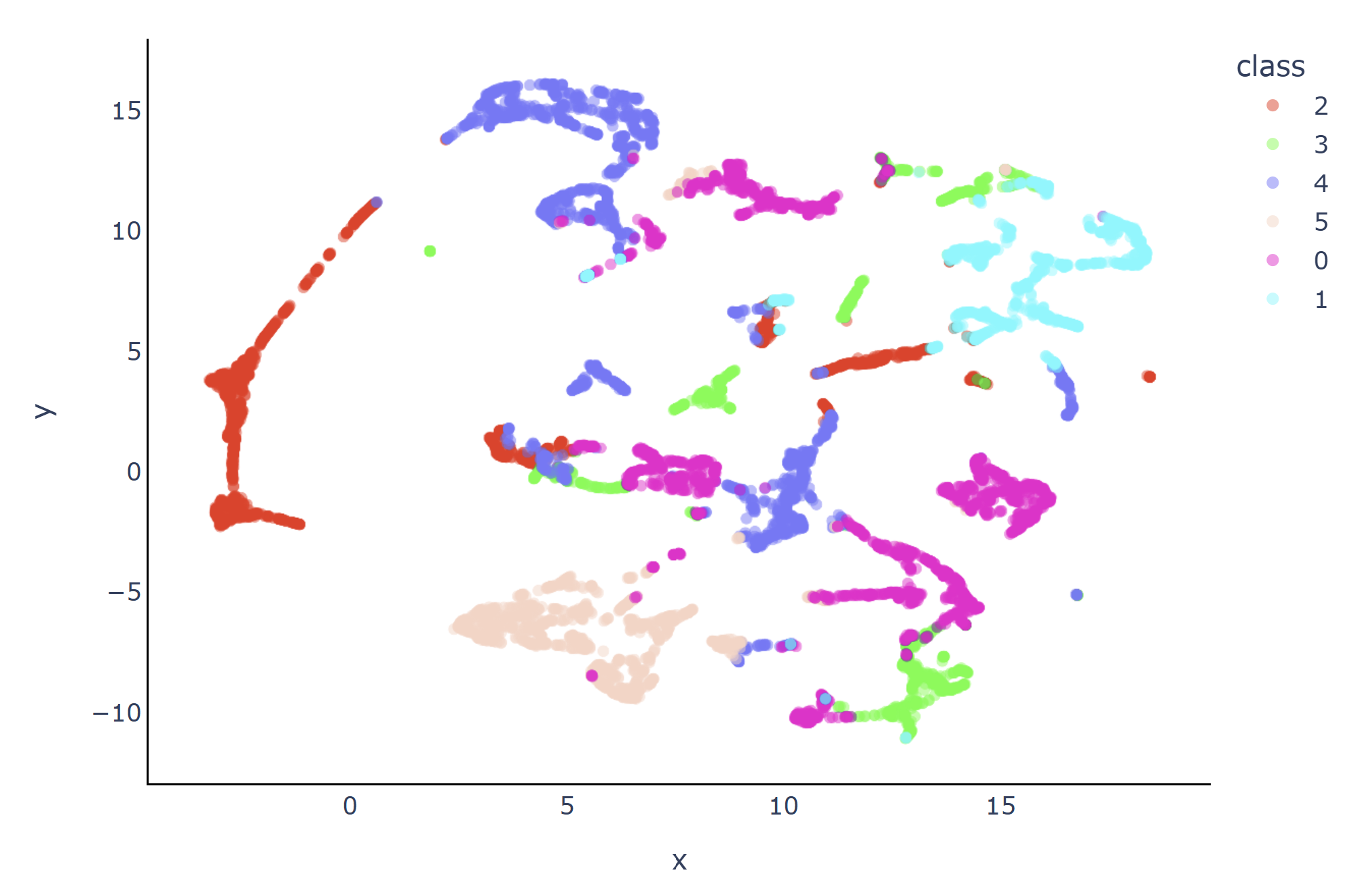
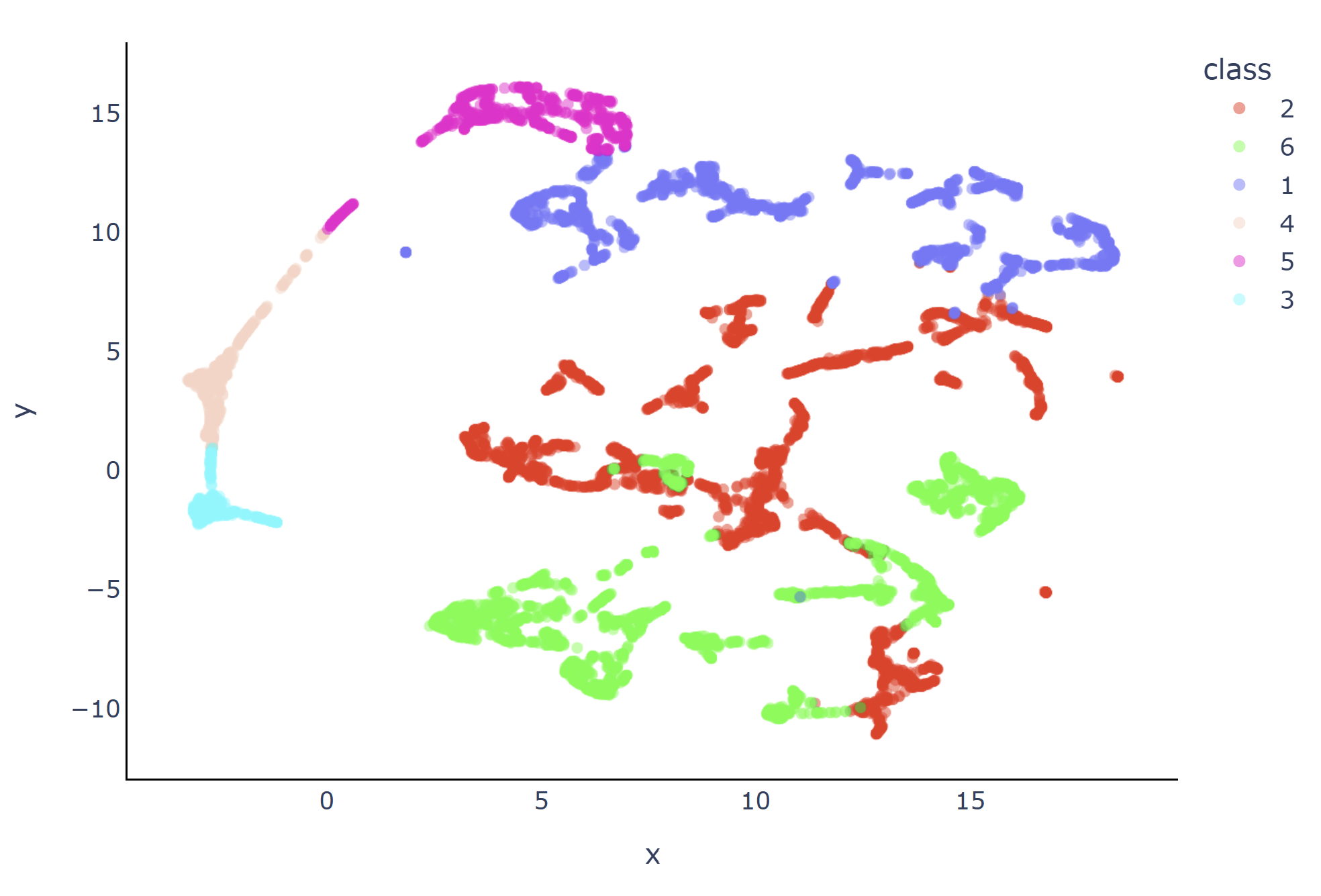
- UMAP visualization: each point represents a subtomogram embedding
- KMeans clustering: coarse grouping of similar structures
- Spectral clustering: captures fine-grained structural variability
Embedding space projection (UMAP)

KMeans clustering
Spectral clustering
Trained Model
Pre-trained embedding models are available for the different masking strategies.
Example model (convex hull masking): CryoSiam subtomogram embedding convex-hull model (v1.0)
Example model for centers (no masking): CryoSiam subtomogram embedding no masking model (v1.0)
A list of all the provided models is available here: Trained models
Running subtomogram embeddings
Generate embeddings from instance masks
cryosiam simsiam_embeddings_predict --config_file=configs/subtomo_embeddings.yaml
To process a single tomogram only:
cryosiam simsiam_embeddings_predict --config_file=configs/subtomo_embeddings.yaml --filename TS_01.mrc
Generate embeddings from particle centers
cryosiam simsiam_embeddings_from_centers_predict --config_file configs/subtomo_embeddings.yaml
To process a single tomogram only:
cryosiam simsiam_embeddings_from_centers_predict --config_file=configs/subtomo_embeddings.yaml --filename TS_01.mrc
This command:
- Reads particle centers from a .star or .csv file
- Extracts fixed-size subtomograms around each center
- Computes embeddings using the selected SimSiam model
Particle centers file format
When using center-based embeddings, particle coordinates must be provided in a .star or .csv file.
Mandatory fields
| Field name | STAR equivalent | Description |
|---|---|---|
| tomo | rlnMicrographName | Tomogram name or path |
| centroid-0 | rlnCoordinateZ | Z coordinate (voxel) |
| centroid-1 | rlnCoordinateY | Y coordinate (voxel) |
| centroid-2 | rlnCoordinateX | X coordinate (voxel) |
- One row per particle
- Coordinates must be in voxel space
- All tomograms to be processed must be listed in the same file
- Additional columns are allowed and ignored
Visualize Embeddings
cryosiam simsiam_visualize_embeddings --config_file=configs/subtomo_embeddings.yaml
This command generates PCA/UMAP projections and distance maps for qualitative inspection.
(Optional) Cluster embeddings
KMeans clustering:
cryosiam simsiam_embeddings_kmeans_clustering --config_file=configs/subtomo_embeddings.yaml
Spectral clustering:
cryosiam simsiam_embeddings_spectral_clustering --config_file=configs/subtomo_embeddings.yaml
Example Configuration (configs/config_subtomo_embeddings.yaml)
data_folder: '/scratch/stojanov/dataset1/predictions/denoised'
instances_mask_folder: '/scratch/stojanov/dataset1/predictions/instances'
centers_file: '/scratch/stojanov/dataset1/ribosome_centers.star'
centers_patch_size: 32
prediction_folder: '/scratch/stojanov/dataset1/predictions/subtomo_embeds'
trained_model: '/g/zaugg/stojanov/simulated_datasets/final_models/simsiam_contrastive/version_1/model/last.ckpt'
contrastive: True
file_extension: '.mrc'

test_files: null
clustering_files: null
visualization_files: null

min_particle_size: 10
max_particle_size: null
masking_type: 1
expand_labels: 3

clustering_kmeans:
  num_clusters: 6
  visualization: True

clustering_spectral:
  num_clusters: 6
  estimate_num_clusters: False
  visualization: True

visualization:
  prediction_folder: '/scratch/stojanov/dataset1/predictions/subtomo_embeds/vis'
  distance: 'euclidean'
  pca_components: null
  visualization_suffix: 'instance_regions.csv'
  visualize_umap: True
  3d_umap: False

parameters:
  data:
    patch_size: [ 64, 64, 64 ]
    patch_overlap: null
    min: 0
    max: 1
    mean: 0
    std: 1
  network:
    spatial_dims: 3
    in_channels: 1
    dim: 1024

hyper_parameters:
  batch_size: 10
Config Reference
Top‑level keys
| Key | Type | Must change the default value | Description |
|---|---|---|---|
data_folder |
str |
✅ | Path to denoised tomograms |
instances_mask_folder |
str |
✅ | Path to instance segmentation masks; null when working with centers |
centers_file |
str |
✅ | Path to particle centers file; null when working with instance masks |
centers_patch_size |
int |
✅ | Patch size around particle centers; null when working with instance masks |
prediction_folder |
str |
✅ | Output directory for embeddings |
trained_model |
str |
✅ | SimSiam embedding model checkpoint (.ckpt) |
contrastive |
bool |
❌ | Indicates contrastive (SimSiam) training |
file_extension |
str |
❌ | Input file extension (.mrc or .rec, default: .mrc) |
test_files |
list[str] or null |
❌ | Specific tomograms to process; null processes all files |
min_particle_size |
int |
✅ | Minimum voxel size of valid instances |
max_particle_size |
int or null |
❌ | Maximum voxel size (optional); null = no limit. |
masking_type |
int |
❌ | Mask generation method (0 = no masking, 1 = convex hull masking, 2 - strict masking) |
expand_labels |
int |
❌ | Number of voxels to expand around mask boundaries for convex hull or strict masking |
clustering_kmeans
| Key | Type | Must change the default value | Description |
|---|---|---|---|
num_clusters |
int |
✅ | Number of clusters for KMeans algorithm |
visualization |
bool |
❌ | If true, generate scatter/UMAP plots of the embeddings |
clustering_spectral
| Key | Type | Must change the default value | Description |
|---|---|---|---|
num_clusters |
int |
✅ | Expected number of spectral clusters |
estimate_num_clusters |
bool |
❌ | If true, automatically estimate cluster number |
visualization |
bool |
❌ | Enable cluster visualizations |
visualization
| Key | Type | Must change the default value | Description |
|---|---|---|---|
prediction_folder |
str |
✅ | Directory for saving visualizations and projections. |
distance |
str |
❌ | Metric for pairwise similarity (euclidean, cosine, etc.). |
pca_components |
int or null |
❌ | Number of PCA components before projection. |
visualization_suffix |
str |
❌ | CSV file containing mapping between IDs and embedding vectors. |
visualize_umap |
bool |
❌ | Run 2D UMAP projection for visualization. |
3d_umap |
bool |
❌ | Run 3D UMAP visualization (interactive). |
parameters
| Key | Type | Must change the default value | Description |
|---|---|---|---|
data.patch_size |
list[int] |
❌ | Sliding-window patch size for 3D inference |
data.min |
float |
❌ | Intensity minimum value for data scaling |
data.max |
float |
❌ | Intensity maximum value for data scaling |
data.mean |
float |
❌ | Mean used for normalization |
data.std |
float |
❌ | Std used for normalization |
network.in_channels |
int |
❌ | Number of input channels (usually 1) |
network.spatial_dims |
int |
❌ | Dimensionality of the model (3 for tomograms) |
network.dim |
int |
❌ | Dimension of embedding space (e.g., 1024). |
hyper_parameters
| Key | Type | Must change the default value | Description |
|---|---|---|---|
batch_size |
int |
❌ | Number of subtomograms per batch (default 10) |
Troubleshooting
| Symptom | Suggested Fix |
|---|---|
| Empty embedding CSV | Check instance masks and instances_mask_folder |
| Few embeddings | Lower min_particle_size |
| GPU memory error | Reduce batch_size |
| Clusters overlap visually | Increase num_clusters or use spectral clustering |
| Embeddings dominated by background | Reduce centers_patch_size |